




Exposing Android App Capabilities to AI using App Functions
Back in 2025, Google started replacing Google Assistant with Gemini, moving toward Personalized AI - assistant. Since then, Gemini has gradually become a bigger part of Android, changing how users interact with their devices through features like Gemini Live and more.
As part of this shift, Google introduced App Functions, a new Android API that allows developers to expose app capabilities for AI-driven interactions. This enables AI assistants like Gemini to directly invoke functionality within apps.
In this article, we’ll explore what App Functions are, how to implement them, and how to test them.
What is App Functions?
Just like MCP enables AI agents to connect with external systems, App Functions allow AI agents or assistants like Gemini to interact directly with an app and perform specific actions.
App Functions is an Android API available through Jetpack libraries. It allows developers to expose app functionalities to AI agents.
Not all AI agents can access these capabilities. Agents must have the EXECUTE_APP_FUNCTIONS permission to discover and execute app functions.
How to integrate App Functions in your app
Now let’s see how to expose app functionality to AI agents.
To start using App Functions, the required Jetpack dependencies must be added to your project.
dependencies {
    implementation("androidx.appfunctions:appfunctions:1.0.0-alpha09")
    implementation("androidx.appfunctions:appfunctions-service:1.0.0-alpha09")
    ksp("androidx.appfunctions:appfunctions-compiler:1.0.0-alpha09")
}
It is recommended to check the official library page for the latest available version.
To help the AI Agents discover exposed functions , KSP should be configured with :
ksp {
	arg("appfunctions:aggregateAppFunctions","true")
}
Once configured, AI agents will recognize the app’s functions.
Exposing app functionality to AI agents
- The
@AppFunctionannotation is used to expose a function. To give context to the AI about the function, you should include a KDoc comment and setisDescribedByKDoc = true. @AppFunctionSerializableindicate that it can be serialized and transferred between processes using AppFunction.
Example
I integrated App Functions in my Habit Diary app as follows:
class AppFunctions(
    private val habitLocalRepository: HabitLocalRepository
) {

    /**
     * This data class represents the details of the habits
     */
    @AppFunctionSerializable(isDescribedByKDoc = true)
    data class HabitDetails(
        /** id for the habit **/
        val habitId : Long,

        /** name of the habit **/
        val habitName: String,

        /** description of the habit **/
        val habitDescription: String,

        /** time at which the habit has to be done **/
        val habitTime: String
    )

    /**
     * Retrieves the list of habits scheduled for today that are not yet completed.
     *
     * @param appFunctionContext The context of this app function call.
     *
     * @return A list of HabitDetails representing all pending habits for the current day.
     */
    @AppFunction(isDescribedByKDoc = true)
    suspend fun checkForCurrentPendingHabits(
        appFunctionContext: AppFunctionContext
    ): List<HabitDetails> {
        return withContext(Dispatchers.IO) {
            val pendingHabits =
                habitLocalRepository.getTodayHabits().filter { !it.isDone }

            pendingHabits.map { it.habitEntity.toHabitDetails() }
        }
    }

    /**
     * This function is used to create a habit or update a habit.
     *
     * If the user wants to update or edit a habit, first find the exact habit using [getAllHabits]
     * and then pass the habitId to this function along with the updated details.
     *
     * If the user wants to create a new habit then pass null as habitId.
     *
     * @param habitId The unique identifier of the habit to be updated. If null, a new habit will be created.
     *
     * @param appFunctionContext The context of this app function call.
     *
     * @param habitName The name of the habit.
     *
     * @param habitDescription A detailed description of the habit.
     *
     * @param habitTime The time at which the habit should be performed, in 24-hour format (HH:mm). For example, "07:30" represents 7:30 AM.
     *
     * @param habitFrequency A list of days on which the habit should repeat. Each value must be a valid day of the week in uppercase, such as "MONDAY", "TUESDAY", etc.
     *
     * @param habitReminderTime The time at which a reminder should be triggered before or at the habit time, in 24-hour format (HH:mm). For example, "07:00".
     *
     * @param isReminderEnabled A boolean indicating whether the reminder for this habit is enabled or not.
     */
    @AppFunction(isDescribedByKDoc = true)
    suspend fun upsertHabit(
        appFunctionContext: AppFunctionContext,
        habitId: Long? = null,
        habitName: String,
        habitDescription: String,
        habitTime: String,
        habitFrequency: List<String>,
        habitReminderTime: String,
        isReminderEnabled : Boolean
    ) {
        withContext(Dispatchers.IO) {

            val parsedHabitTime = LocalTime.parse(habitTime)
            val parsedReminderTime = LocalTime.parse(habitReminderTime)

            val parsedFrequency = habitFrequency.map {
                DayOfWeek.valueOf(it.uppercase())
            }

            val habitEntity = HabitEntity(
                id = habitId ?: 0 ,
                habitName = habitName,
                habitDescription = habitDescription,
                habitTime = parsedHabitTime,
                habitFrequency = parsedFrequency,
                habitReminder = parsedReminderTime,
                isDeleted = false,
                isReminderEnabled = isReminderEnabled,
                createdAt = DateUtil.getCurrentDateTime(),
            )

            habitLocalRepository.upsetHabit(habitEntity)
        }
    }

    /**
     * Retrieves the list of habits scheduled for today that are not yet completed.
     *
     * @param appFunctionContext The context of this app function call.
     *
     * @return A list of HabitDetails representing all habits.
     */
    @AppFunction(isDescribedByKDoc = true)
    suspend fun getAllHabits(
        appFunctionContext: AppFunctionContext
    ): List<HabitDetails> {
        return withContext(Dispatchers.IO) {
            val pendingHabits =
                habitLocalRepository.getAllHabits().filter { !it.isDeleted }

           pendingHabits.map { it.toHabitDetails() }
        }
    }

    private fun HabitEntity.toHabitDetails(): HabitDetails {
        return HabitDetails(
            habitId = this.id,
            habitName = this.habitName,
            habitDescription = this.habitDescription,
            habitTime = this.habitTime.toString()
        )
    }
}
In my app, I created an AppFunctions class that exposes habit-related features to AI agents using the @AppFunction annotation.
This class interacts with a local repository and provides a few core capabilities like fetching pending habits, creating or updating a habit, and retrieving all stored habits.
As you can see, I have clearly described what each function does, what it returns, and the parameters required to execute it. When isDescribedByKDoc is set to true, the annotation uses this documentation to automatically generate the necessary context about the function for the AI agent.
If my App Functions class requires a dependency like habitLocalRepository, We need to provide a custom factory so the system can correctly instantiate the class and make the dependency available.
Providing a custom factory
If your AppFunctions class requires dependencies (like HabitLocalRepository), you need to provide a factory so the system knows how to instantiate it.
If your App Functions class has no dependencies, the system can instantiate it automatically.
Here’s how to do it using Hilt:
@HiltAndroidApp
class HabitDiaryApplication : Application(), AppFunctionConfiguration.Provider {
    @Inject lateinit var appFunction : AppFunctions
    override val appFunctionConfiguration: AppFunctionConfiguration
        get() =
            AppFunctionConfiguration.Builder()
                .addEnclosingClassFactory(AppFunctions::class.java) { appFunction }
                .build()
}
If your app function doesn’t have any dependencies that need to be injected, the App Function instance will be created automatically.
That’s it! Your App Function is now ready. This will expose its functionality to AI agents, allowing them to execute it.
Testing
To test App Functions, the agent app requires the EXECUTE_APP_FUNCTIONS permission. Currently, this is an internal permission and is not available in production apps.
Later, during Google I/O, a test agent was released for developers.
After downloading the ZIP file, extract the ZIP file, install the APK on your device, and then run the following command in the terminal:
./startAppFunctionStudioThis launches the app with EXECUTE_APP_FUNCTIONS permission.
If everything is set up correctly, you will be able to see all your defined App Functions and execute them directly in the agent app.
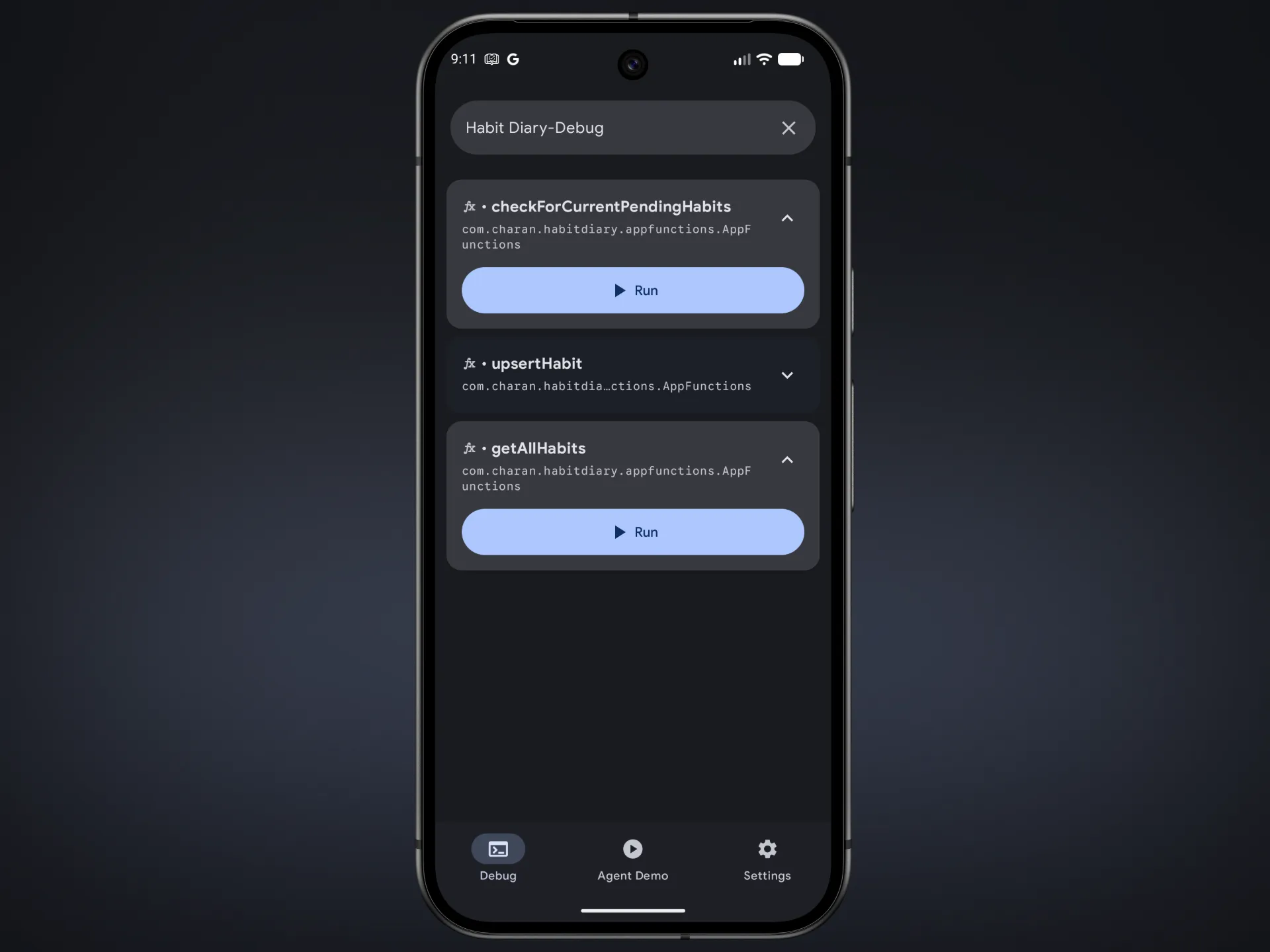
Under the Debug tab, you can search for your app by name. If everything is configured correctly, you will see all the App Functions defined in your app.
To test App Functions with an AI agent, open the Agent Demo tab and enter a prompt related to the functionality exposed by your App Functions. This allows you to verify whether the agent can correctly discover and execute your functions.
To use the Agent Demo, you will need a Gemini API key, which can be obtained from AI Studio.
Conclusion
And that’s all it takes to set up and test App Functions in your Android app. Personally, I think this is a really interesting feature because it allows apps to become much more useful in an AI-driven world.
I hope you enjoyed this first post! I’m always open to feedback and would love to hear your thoughts. Please let me know if there’s anything you think I missed or any suggestions you have for future posts. I look forward to connecting with you again soon.